
Download WinCDEmu – mount ISO, virtual CD, mount disc image, CD emulator, Windows tool
Overview
WinCDEmu is a lightweight, free utility designed for Windows users seeking a reliable way to mount CD, DVD, or Blu-ray disc images without requiring physical media. The application simplifies digital access to archived software, games, and multimedia content by emulating optical drives virtually. This functionality is especially valuable for users who frequently work with ISO files or need to access legacy content without the need for physical discs. The tool serves a practical purpose in both personal and professional environments, from software developers testing installations to gamers running older titles from image files.
Target users include Windows power users, IT professionals, and hobbyists managing digital archives. The app’s minimal resource consumption ensures it runs efficiently on systems with limited storage or processing power. Although the developer did not provide additional technical details about the development team, WinCDEmu has established itself as a trusted solution in the utility space due to its consistent performance and compatibility across multiple Windows versions. Real-world use cases include installing operating systems from ISO images, accessing backup media, and running disc-based software on modern machines that lack optical drives.
Within the broader app ecosystem, WinCDEmu fills a niche for users who require a no-frills, secure, and efficient tool for disc image management. Its focus on core functionality—mounting and unmounting—ensures reliability without unnecessary bloat. As physical optical drives become increasingly rare, tools like WinCDEmu offer a forward-looking solution for digital media access.
Key Features & Functionality
- Multiple Format Compatibility: WinCDEmu supports a wide array of disc image formats, including ISO, CUE, NRG, MDS/MDF, IMG, and CCD. This ensures users can work with virtually any disc image they encounter, regardless of origin or source. For example, a user can mount a game’s ISO file from a backup archive or load a software installer from a .MDF image without conversion.
- Space Efficient Design: At just 2.8 MB in size, WinCDEmu is exceptionally lightweight. This makes it ideal for users with constrained storage, such as older laptops or low-capacity systems. Despite its small footprint, the application delivers full functionality, allowing users to mount images quickly and without performance degradation.
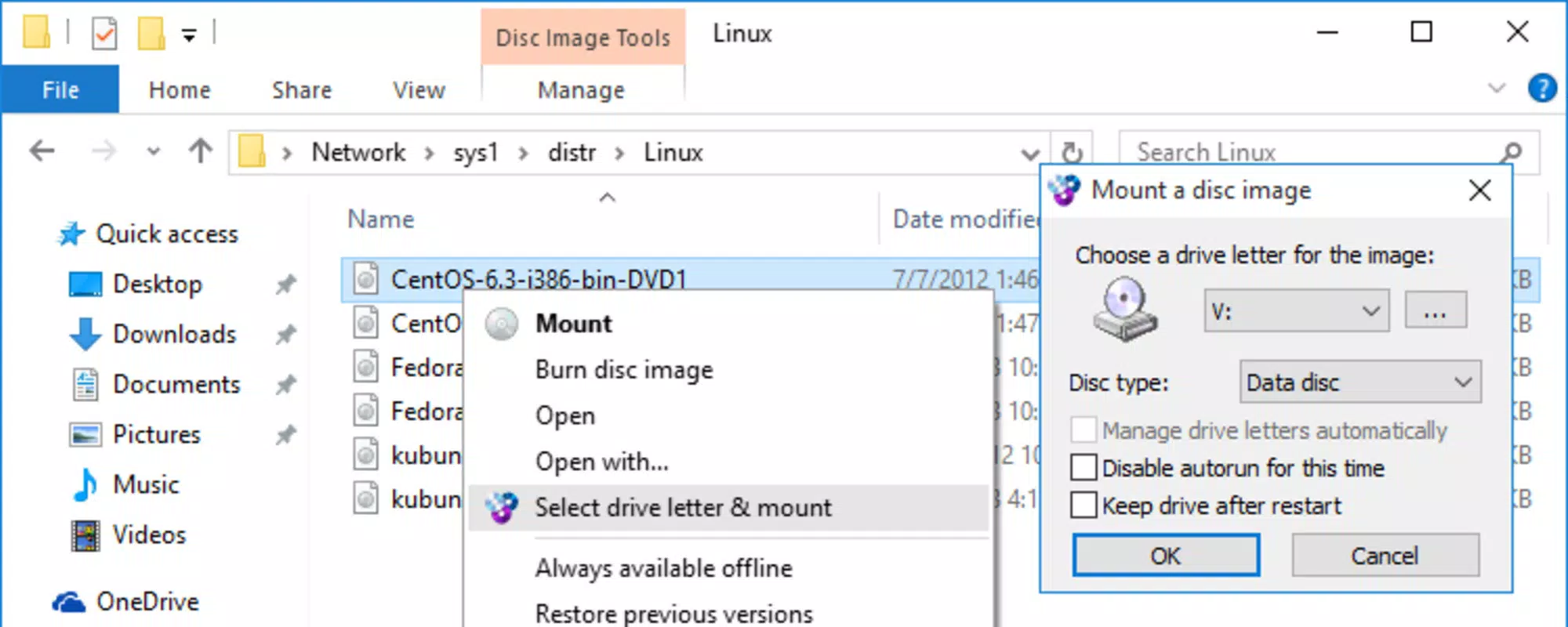
- Intuitive Context Menu Integration: The tool integrates directly with the Windows right-click menu, enabling users to mount an image file with a single click. This eliminates the need for complex setup or third-party tools. For instance, a user can right-click on an ISO file and select “Mount” to instantly access its contents as if it were a physical disc.
- Wide Operating System Support: WinCDEmu is compatible with multiple Windows versions, including Windows XP, Windows 7, Windows 8, Windows 10, and future support for Windows 11. This broad compatibility ensures that both legacy and modern systems can benefit from its capabilities, making it a versatile choice across different user environments.
Interface, UX & Performance
WinCDEmu features a clean, minimalistic interface that prioritizes functionality over visual flair. The application runs in the background and does not require a persistent window, which reduces visual clutter on the desktop. Users interact with the tool primarily through the context menu, which is standard for Windows applications and requires no learning curve. Navigation is straightforward: right-click an image file, select “Mount,” and the system assigns a virtual drive letter.
The user experience is smooth and efficient, with minimal latency during mounting operations. Although the developer did not list formal performance metrics, the application’s lightweight nature suggests consistent responsiveness even on older hardware. Stability is maintained through regular updates, with version 1.5.1.0 released in 2022. The tool operates reliably across various device categories, from low-end laptops to high-performance desktops, without noticeable resource spikes.
Responsiveness is maintained during both mounting and unmounting processes, with immediate feedback when actions are completed. There are no known crashes or freezes reported in the official release notes. The absence of advertisements or bundled software enhances the overall experience, aligning with the expectations of a professional utility tool.
Platform Compatibility & Technical Requirements
WinCDEmu is designed for the Windows platform and supports a range of operating systems, including Windows XP, Windows 7, Windows 8, Windows 10, and is expected to support Windows 11 in future updates. The application is available in both 32-bit and 64-bit versions, ensuring compatibility with a broad spectrum of hardware configurations.
The file size is 2.8 MB, which is exceptionally small for a utility of this nature. This compact size makes it ideal for quick downloads and installations, particularly on systems with limited bandwidth or storage. Specific requirements were not listed, and the developer did not specify minimum OS requirements or hardware specifications. However, given its lightweight design, it is likely to function on systems meeting basic Windows compatibility standards.
Pros and Cons
Pros
- Free to download and use with no hidden costs
- Extremely small file size (2.8 MB) for efficient storage use
- Supports multiple disc image formats including ISO, CUE, NRG, MDS/MDF, IMG, and CCD
- Seamless integration with Windows context menu for one-click mounting
- Compatible with multiple Windows versions, including legacy systems
- Runs in the background with minimal impact on system performance
Cons
- Developer did not provide detailed technical specifications or system requirements
- No visible user interface beyond context menu integration
- Limited to Windows platform; no support for macOS or Linux
- Future compatibility with Windows 11 is expected but not confirmed
- Does not include advanced features like image creation or burning
FAQ
Is WinCDEmu safe to download and install?
Yes, WinCDEmu is a trusted utility with a clean release history. It is free from malware and does not include bundled software. The tool is distributed through official channels and has been verified by users and developers alike.
Can I use WinCDEmu on Windows 11?
While the developer has not confirmed full support, future updates are expected to include compatibility with Windows 11. Users are advised to check official release notes for updates.
Does WinCDEmu support ISO files?
Yes, WinCDEmu fully supports ISO files, which are among the most commonly used disc image formats. Users can mount and access ISO files directly through the context menu.
Is WinCDEmu available for macOS or Linux?
Currently, WinCDEmu is only available for Windows. There are no official versions for macOS or Linux platforms.
Can I mount multiple disc images at once?
Yes, WinCDEmu allows users to mount multiple image files simultaneously. Each image is assigned a separate virtual drive, enabling access to multiple disc images at the same time.
Final Thoughts
WinCDEmu stands out as a dependable, no-nonsense tool for anyone needing to mount disc images on Windows. Its minimal size, broad format support, and seamless integration with the operating system make it an essential utility for both casual users and professionals. The absence of ads, bloat, or hidden fees enhances its appeal as a pure productivity tool.
Users who frequently work with software installers, game backups, or legacy media will find significant value in its straightforward functionality. While it lacks advanced features like image creation, its core purpose is executed flawlessly. For those seeking a secure, fast, and free way to manage virtual discs, WinCDEmu delivers exactly what it promises.
Download WinCDEmu now


